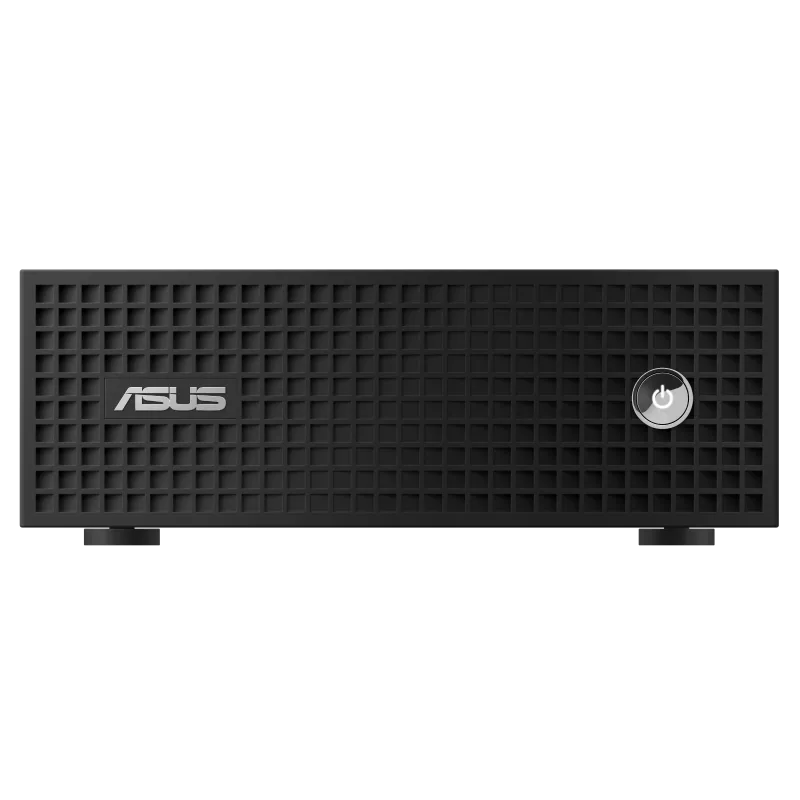
Powerful AI Workstation in a Compact Form Factor
The demand for compact desktop computers has grown rapidly over the past few years, but creative professionals have often had to compromise between size and performance. The ASUS ProArt Mini PC aims to eliminate that compromise by packing workstation-grade hardware into an incredibly compact chassis. Designed specifically for content creators, architects, engineers, AI developers, photographers, video editors, and 3D artists, this mini workstation delivers desktop-class performance without occupying an entire desk.
Unlike traditional mini PCs that primarily target office users, the ASUS ProArt Mini PC focuses on professional creative workloads. Equipped with the latest Intel Core Ultra processors, NVIDIA RTX graphics, AI acceleration, extensive connectivity, and enterprise-level reliability, it promises to become the centerpiece of any modern creative workspace.
Whether you’re editing 8K videos, rendering complex 3D scenes, running AI models locally, or working with massive RAW photo libraries, this compact desktop is engineered to keep up with demanding workflows while maintaining quiet operation and impressive energy efficiency.
Let’s explore everything the ASUS ProArt Mini PC has to offer.
ASUS ProArt Mini PC at a Glance
| Feature | Details |
|---|---|
| Product | ASUS ProArt Mini PC |
| Category | Compact Professional Workstation |
| Processor | Intel Core Ultra Series |
| Graphics | NVIDIA RTX Professional Graphics |
| AI Engine | Intel NPU + NVIDIA AI Acceleration |
| Memory | Up to 64GB DDR5 |
| Storage | Multiple PCIe Gen4 SSD Options |
| Connectivity | Thunderbolt 4, USB-C, USB-A, HDMI, DisplayPort, Ethernet |
| Wireless | Wi-Fi 7, Bluetooth 5.x |
| Operating System | Windows 11 Pro |
| Best For | Video Editing, AI Development, CAD, 3D Rendering, Professional Content Creation |
Premium Compact Design
One of the most impressive aspects of the ASUS ProArt Mini PC is its industrial design. ASUS has built the system with professional environments in mind, using a clean matte finish, subtle branding, and excellent ventilation.
Unlike flashy gaming desktops with RGB lighting, the ProArt Mini PC blends perfectly into studios, editing suites, engineering offices, and home workstations.
Despite its small footprint, ASUS has optimized internal airflow remarkably well. The cooling system efficiently dissipates heat even during prolonged rendering sessions, ensuring sustained performance without excessive fan noise.
The compact design also makes it easy to mount behind monitors using VESA mounts, saving valuable desk space.
Built for AI Workloads
Artificial Intelligence is rapidly becoming an essential part of modern creative workflows, and ASUS has ensured the ProArt Mini PC is future-ready.
The latest Intel Core Ultra processors include a dedicated Neural Processing Unit (NPU) designed specifically for AI tasks. Combined with NVIDIA RTX GPUs, users benefit from multiple AI acceleration engines working together.
AI-powered applications include:
- Adobe Firefly
- Photoshop Generative Fill
- Premiere Pro AI enhancements
- DaVinci Resolve AI tools
- Stable Diffusion
- Local LLM inference
- AI image generation
- AI-assisted video editing
- Noise reduction
- Speech enhancement
- Automatic object detection
This makes the ProArt Mini PC ideal for professionals increasingly relying on AI-assisted creativity.
Intel Core Ultra Performance
At the heart of the system sits Intel’s latest Core Ultra processor lineup.
These processors combine:
- High-performance cores
- Efficient cores
- Intel Arc integrated graphics
- Dedicated NPU
- Improved power efficiency
For multitasking, the CPU excels at simultaneously handling:
- 8K video exports
- Photoshop editing
- Blender rendering
- Background AI processing
- Browser tabs
- Music production
- Virtual machines
This balanced architecture provides impressive responsiveness throughout demanding workflows.
NVIDIA RTX Graphics
Creative professionals often require GPU acceleration more than raw CPU performance.
The ASUS ProArt Mini PC addresses this with NVIDIA RTX graphics capable of accelerating:
- Adobe Premiere Pro
- Adobe After Effects
- Blender Cycles
- Autodesk Maya
- Cinema 4D
- DaVinci Resolve
- Unreal Engine
- Unity
- CAD software
- Architectural visualization
RTX hardware acceleration dramatically reduces rendering times while enabling real-time ray tracing and AI-enhanced workflows.
Professionals working with GPU-intensive applications will appreciate the substantial productivity gains.
Memory and Storage
Modern creative projects consume enormous amounts of memory and storage.
The ASUS ProArt Mini PC supports:
- Up to 64GB DDR5 RAM
- High-speed PCIe Gen4 SSDs
- Expandable storage options
- Fast boot times
- Large project handling
- Quick file transfers
Whether managing hundreds of RAW images or editing feature-length 4K footage, the system offers the speed necessary to keep projects moving efficiently.
Creator-Centric Connectivity
Professional workflows require more than raw processing power—they demand versatile connectivity.
The ASUS ProArt Mini PC delivers with an extensive selection of ports, including:
- Thunderbolt 4
- USB-C
- USB-A
- HDMI
- DisplayPort
- High-speed Ethernet
- Audio ports
- SD card support (on select configurations)
This allows users to connect:
- Professional monitors
- External GPUs
- RAID storage
- Cameras
- Audio interfaces
- Capture cards
- Drawing tablets
- VR headsets
The inclusion of Thunderbolt 4 ensures ultra-fast data transfer and support for multiple high-resolution displays.
Multi-Monitor Productivity
Creative professionals rarely work on a single display.
The ASUS ProArt Mini PC supports multiple 4K and even 8K monitors depending on the GPU configuration.
A typical workstation setup may include:
- Primary editing monitor
- Timeline display
- Reference monitor
- Chat and communication display
The graphics subsystem handles multi-monitor environments smoothly without sacrificing performance.
AI Creator Applications
The ProArt Mini PC shines in AI-enhanced creative software.
Examples include:
Adobe Creative Cloud
AI-assisted masking, object removal, image generation, color grading, and speech enhancement all benefit from GPU acceleration.
Blender
Faster Cycles rendering, AI denoising, viewport acceleration, and improved simulation performance.
DaVinci Resolve Studio
AI Magic Mask, object tracking, face refinement, scene detection, and intelligent reframing become significantly faster.
Stable Diffusion
Users can locally generate high-resolution AI artwork with reduced generation times thanks to RTX Tensor Cores.
Quiet Cooling System
Rendering workloads often push desktops to their thermal limits.
ASUS has engineered an efficient thermal solution that balances:
- Low temperatures
- Quiet fan operation
- Long-term reliability
- Sustained turbo performance
Even during extended exports or AI model training, noise levels remain relatively low, making the system suitable for recording studios and quiet office environments.
Security Features
For enterprise and professional users, ASUS includes security capabilities such as:
- TPM support
- Windows Hello compatibility
- Secure Boot
- BIOS protection
- Enterprise management options
These features help protect sensitive client projects and intellectual property.
Energy Efficiency
Compared to traditional tower workstations, the ASUS ProArt Mini PC consumes significantly less power while still delivering impressive performance.
Benefits include:
- Lower electricity bills
- Reduced heat output
- Smaller carbon footprint
- Quiet operation
- Better office comfort
This makes it an excellent long-term investment for studios and businesses.
Who Should Buy the ASUS ProArt Mini PC?
The ASUS ProArt Mini PC is an excellent choice for:
- Professional video editors
- Graphic designers
- 3D artists
- Architects
- Engineers
- Photographers
- AI developers
- Software developers
- Content creators
- Animation studios
- Music producers
- CAD professionals
Its balance of power, portability, and reliability makes it suitable for a wide range of demanding creative and technical workflows.
ASUS ProArt Mini PC vs Traditional Desktop
| Feature | ASUS ProArt Mini PC | Traditional Tower PC |
|---|---|---|
| Size | Extremely Compact | Large |
| AI Performance | Excellent | Excellent |
| Desk Space | Minimal | High |
| Power Consumption | Lower | Higher |
| Noise | Quieter | Depends on Build |
| Portability | Excellent | Poor |
| Professional Appearance | Excellent | Varies |
| Maintenance | Easy | Moderate |
Pros and Cons
Pros
- Compact workstation-class design
- Excellent Intel Core Ultra performance
- NVIDIA RTX GPU acceleration
- Dedicated AI hardware
- Quiet cooling system
- Extensive connectivity including Thunderbolt 4
- Supports multiple high-resolution displays
- Fast DDR5 memory and PCIe Gen4 SSD storage
- Energy efficient compared to traditional towers
- Ideal for creators, engineers, and AI developers
Cons
- Premium pricing compared to standard mini PCs
- Limited internal upgradeability versus full-size desktop towers
- High-end configurations may be overkill for casual users
- Heavy GPU workloads may still favor larger workstation desktops with more expansion options
Buying Considerations
Before purchasing the ASUS ProArt Mini PC, consider the following:
- Workload Requirements: Entry-level creators may not need RTX-equipped models, while professionals handling AI, CAD, or 8K video editing will benefit from higher-end configurations.
- Memory Capacity: Choose at least 32GB RAM for demanding multitasking and future-proofing.
- Storage Needs: Opt for larger PCIe Gen4 SSDs if you regularly work with large media libraries.
- Display Setup: Verify that the selected GPU configuration supports the number and resolution of monitors you intend to use.
- Upgrade Path: While expandable to a degree, mini PCs generally offer less internal upgrade flexibility than traditional tower workstations.
Final Verdict
The ASUS ProArt Mini PC proves that professional performance no longer requires a bulky workstation. By combining Intel Core Ultra processors, NVIDIA RTX graphics, AI acceleration, fast DDR5 memory, and creator-focused connectivity in a compact chassis, ASUS has built a desktop that caters exceptionally well to modern creative professionals.
Its strengths lie in AI-powered workflows, video editing, 3D rendering, software development, and engineering applications, all while maintaining low noise levels and excellent energy efficiency. Although it commands a premium price and offers fewer upgrade options than full-size towers, the balance of performance, portability, and professional design makes it a compelling investment for creators seeking a powerful yet space-saving workstation.
For professionals who need workstation-class capabilities without sacrificing desk space or aesthetics, the ASUS ProArt Mini PC stands out as one of the most capable compact creator desktops available in 2026.
If you enjoyed this article, don’t miss our previous posts packed with tech insights and reviews—check them out on our website!


