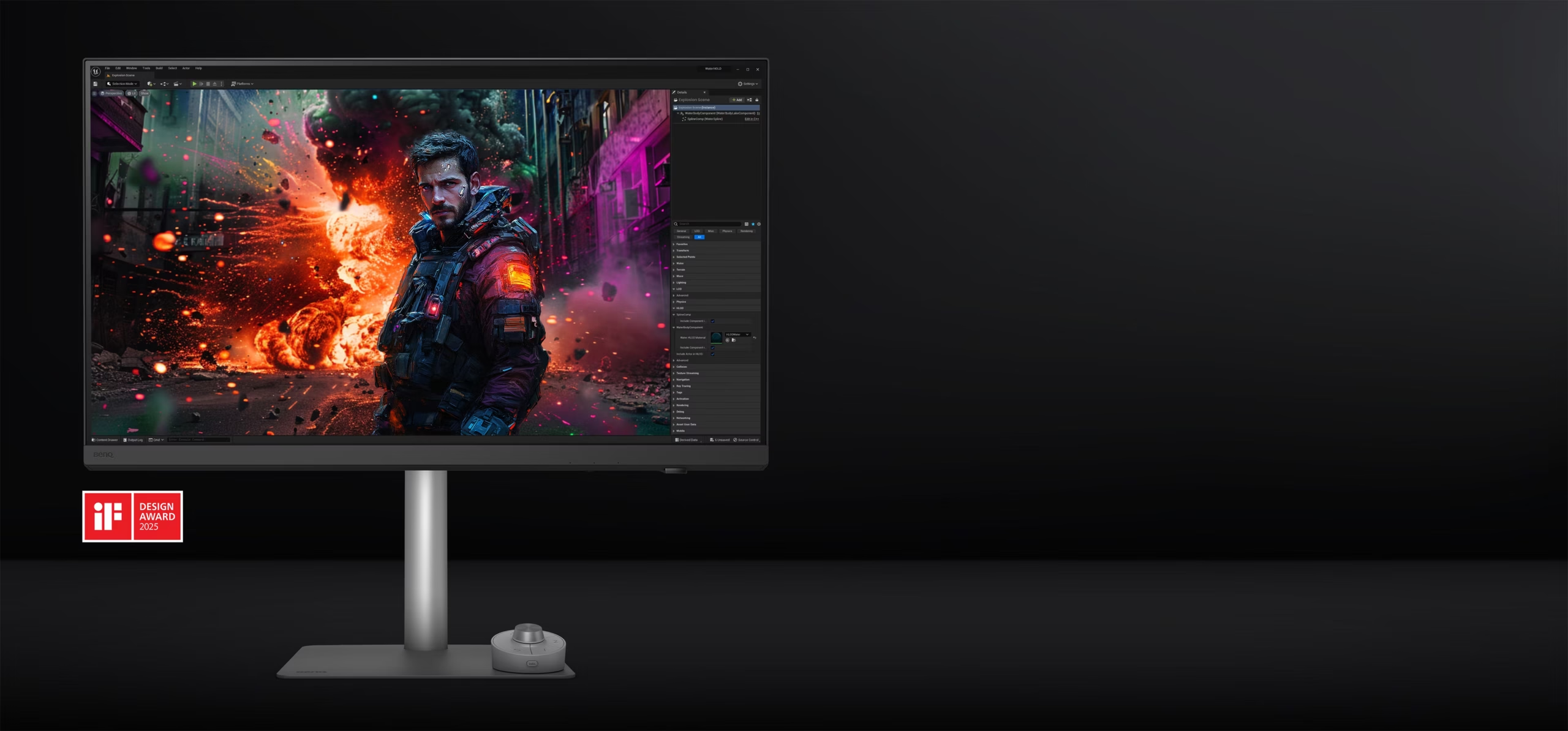
The Creator’s Secret Weapon That Could Transform Your Professional Workflow
As creative industries continue to embrace higher-resolution media, AI-assisted workflows, and increasingly complex design projects, professionals require displays that deliver exceptional color accuracy, reliable consistency, and seamless connectivity. Whether editing 4K video, designing user interfaces, creating digital illustrations, or developing architectural models, the monitor has become one of the most important tools in the creative process.
The BenQ PD3226U is designed specifically for professionals who need uncompromising visual precision. As part of BenQ’s acclaimed PD Series, this premium 32-inch 4K monitor combines factory-calibrated color accuracy, IPS Black technology, Thunderbolt 4 connectivity, and productivity-focused features into a display built for serious creative work.
Unlike gaming monitors that prioritize high refresh rates or consumer displays that focus mainly on entertainment, the PD3226U is engineered to help photographers, designers, architects, engineers, animators, video editors, and content creators achieve consistent, professional-quality results.
This comprehensive review explores the BenQ PD3226U’s display technology, color performance, connectivity, design, professional features, comparisons, pros and cons, buying considerations, and why it could become one of the best creator monitors available.
BenQ PD3226U at a Glance
| Feature | Details |
|---|---|
| Display Size | 31.5 Inches |
| Resolution | 3840 × 2160 (4K UHD) |
| Panel Technology | IPS Black |
| Refresh Rate | 60Hz |
| Color Accuracy | Delta E ≤ 2 |
| Color Coverage | 98% P3, 99% sRGB, 99% Rec.709 |
| HDR | VESA DisplayHDR 400 |
| Connectivity | Thunderbolt 4, HDMI 2.1, DisplayPort, USB Hub |
| KVM Switch | Yes |
| Factory Calibration | Yes |
Premium Industrial Design Built for Creative Studios
The BenQ PD3226U follows a minimalist design philosophy that blends effortlessly into professional workspaces.
Its understated appearance allows users to focus on their projects while benefiting from premium construction and thoughtful ergonomics.
Design highlights include:
- Ultra-slim bezels
- Premium aluminum-inspired stand
- Integrated cable management
- Anti-glare display coating
- VESA mount compatibility
- Compact professional footprint
The ergonomic stand supports:
- Height adjustment
- Tilt
- Swivel
- Pivot
These adjustments allow users to maintain an ideal viewing position throughout long editing sessions.
Stunning 4K IPS Black Display
At the heart of the PD3226U is a 31.5-inch IPS Black panel.
Compared to conventional IPS displays, IPS Black technology delivers:
- Deeper black levels
- Improved contrast ratio
- Better shadow detail
- Superior viewing angles
- Enhanced image depth
The native 4K resolution provides:
- Crisp typography
- Detailed photographs
- Sharp video previews
- More workspace for multitasking
- Precise editing accuracy
For professionals working with intricate graphics or high-resolution media, this level of clarity significantly improves workflow efficiency.
Factory-Calibrated Color Accuracy for Professional Results
Color consistency is one of the defining strengths of the BenQ PD Series.
The PD3226U is factory calibrated to deliver a Delta E ≤ 2, ensuring accurate color reproduction straight out of the box.
Expected color capabilities include:
- 98% DCI-P3
- 99% sRGB
- 99% Rec.709
- 10-bit color support
- Hardware calibration compatibility
These specifications make it suitable for:
- Professional photography
- Graphic design
- Video editing
- Motion graphics
- Digital illustration
- Product design
Accurate colors help ensure that creative work appears consistent across different devices and production environments.
Thunderbolt 4 Simplifies Modern Workstations
One of the monitor’s standout features is its Thunderbolt 4 connectivity.
A single cable can provide:
- 4K video transmission
- High-speed data transfer
- Laptop charging
- USB peripheral connectivity
Additional ports are expected to include:
- HDMI 2.1
- DisplayPort
- USB-C
- USB-A Hub
- Audio output
This streamlined connectivity reduces desktop clutter while supporting modern creative workflows.
Built-In KVM Switch Improves Productivity
The integrated KVM (Keyboard, Video, Mouse) switch is particularly valuable for professionals working across multiple systems.
With a single keyboard and mouse, users can easily switch between:
- Desktop workstations
- Laptops
- Creative devices
This eliminates the need for multiple input peripherals while improving workflow efficiency.
Specialized Display Modes for Creators
BenQ includes several display modes specifically designed for professional work.
Expected modes include:
CAD/CAM Mode
Enhances contrast in technical drawings for architects and engineers.
Animation Mode
Improves shadow visibility when working on detailed animations.
Darkroom Mode
Optimizes brightness and contrast for photographers editing in darker environments.
M-Book Mode
Adjusts color output to better match compatible laptops, creating a more consistent editing experience across devices.
These dedicated modes allow creators to tailor the display to specific workflows without extensive manual adjustments.
Excellent Eye Care for Long Creative Sessions
Creative professionals often spend extended periods in front of their displays.
The PD3226U includes several technologies designed to improve viewing comfort:
- Flicker-Free Technology
- Low Blue Light Mode
- Anti-Glare Surface
- Uniform Brightness Compensation
These features help reduce eye strain during lengthy editing, designing, or coding sessions.
Outstanding Multitasking Performance
The large 32-inch display and 4K resolution provide abundant workspace for demanding applications.
Professionals can comfortably manage:
- Adobe Creative Cloud applications
- Large Photoshop canvases
- 4K video timelines
- Coding environments
- Multiple browser windows
- AI-powered creative software
- Communication tools
The result is a smoother and more efficient workflow with less reliance on secondary monitors.
Expected Technical Specifications
| Specification | Details |
|---|---|
| Screen Size | 31.5 Inches |
| Resolution | 3840 × 2160 |
| Panel | IPS Black |
| Refresh Rate | 60Hz |
| Brightness | 400 Nits |
| HDR | DisplayHDR 400 |
| Color Accuracy | Delta E ≤2 |
| DCI-P3 | 98% |
| sRGB | 99% |
| Thunderbolt 4 | Yes |
| HDMI 2.1 | Yes |
| DisplayPort | Yes |
| KVM Switch | Yes |
| USB Hub | Yes |
BenQ PD3226U vs Previous PD Series Models
| Feature | PD3225U | BenQ PD3226U |
|---|---|---|
| IPS Technology | IPS | IPS Black |
| Contrast | Good | Improved |
| Thunderbolt | Thunderbolt 3 | Thunderbolt 4 |
| Color Accuracy | Excellent | Enhanced Factory Calibration |
| Connectivity | Good | Expanded |
| Productivity Features | Strong | More Advanced |
BenQ PD3226U vs Competitors
| Feature | BenQ PD3226U | Dell UltraSharp 32 | ASUS ProArt PA32 Series |
|---|---|---|---|
| IPS Black | Yes | Yes | Selected Models |
| Thunderbolt 4 | Yes | Yes | Yes |
| Color Accuracy | Excellent | Excellent | Excellent |
| KVM Switch | Yes | Limited | Yes |
| Creator Modes | Extensive | Moderate | Extensive |
| Best For | Designers & Creators | Business Professionals | Professional Studios |
Real-World Performance
Graphic Design
Designers benefit from precise color reproduction, crisp typography, and ample workspace for complex layouts.
Photo Editing
High color accuracy ensures RAW images maintain realistic tones throughout the editing process.
Video Production
Editors can preview 4K footage with excellent detail while maintaining accurate color grading.
Architecture and CAD
Dedicated CAD mode enhances line visibility, making technical drawings easier to review and refine.
Software Development
Developers gain enough screen space to display code editors, terminals, documentation, and debugging tools simultaneously.
Pros and Cons
Pros
- Outstanding 4K IPS Black display
- Excellent factory-calibrated color accuracy
- Thunderbolt 4 connectivity
- Built-in KVM switch
- Multiple creator-specific display modes
- Premium ergonomic design
- Wide color gamut
- Excellent build quality
- Comfortable eye-care technologies
- Ideal for professional creative workflows
Cons
- Premium price point
- 60Hz refresh rate prioritizes productivity over gaming
- HDR400 is suitable for content creation but limited for cinematic HDR playback
- Requires a capable computer to maximize its potential
Buying Considerations
Before purchasing the BenQ PD3226U, assess your workflow and display requirements.
Key considerations include:
- Creative discipline: Ideal for photographers, designers, editors, architects, and digital artists.
- Connectivity: Thunderbolt 4 simplifies cable management and supports modern laptops.
- Workspace: A 32-inch display requires sufficient desk space for comfortable viewing.
- Color-critical work: Factory calibration and wide color coverage make it suitable for professional production environments.
- Long-term investment: Premium build quality and creator-focused features offer lasting value for professionals.
Who Should Buy the BenQ PD3226U?
The BenQ PD3226U is an outstanding choice for:
- Graphic designers
- Professional photographers
- Video editors
- Motion graphics artists
- 3D designers
- Architects
- Software developers
- UI/UX designers
- Creative agencies
- Digital content creators
Casual users or gamers may not fully utilize its professional-grade capabilities, but creators seeking reliable color accuracy and productivity features will find it exceptionally rewarding.
Final Verdict
The BenQ PD3226U is more than just another 4K monitor—it is a professional creative tool engineered to meet the demanding needs of today’s designers, photographers, editors, and digital artists. Its combination of IPS Black technology, factory-calibrated color accuracy, Thunderbolt 4 connectivity, and creator-specific productivity features positions it among the most capable professional displays in its class.
Whether you’re editing high-resolution images, grading 4K video, designing complex interfaces, or managing multi-device workflows with its integrated KVM switch, the PD3226U delivers the precision and reliability required for professional results. Although it commands a premium price, its exceptional display quality, robust connectivity, and thoughtful workflow enhancements make it a worthwhile long-term investment.
For creative professionals seeking a monitor that balances outstanding visual performance with productivity-focused features, the BenQ PD3226U earns its place as one of the most compelling creator displays available today.
If you enjoyed this article, don’t miss our previous posts packed with tech insights and reviews—check them out on our website!


