Important Update (November 2026): Is There a Samsung Smart Monitor M10?
As of November 2026, Samsung has not officially released a Smart Monitor M10. Its current Smart Monitor range is the M5, M7, M8 and M9, and the details about the “M10” below describe an expected next-generation model rather than a product you can buy today.
If you want a Samsung smart monitor now, these are the current models (US list prices on Samsung.com; discounts are common):
| Model | Panel | List price (US) | Best for |
|---|---|---|---|
| Smart Monitor M9 (M90SF), 32″ | 4K QD-OLED | $1,599.99 | Best picture quality, movies |
| Smart Monitor M8 (M80F), 32″ | 4K | $699.99 | Work plus streaming, built-in camera features |
| Smart Monitor M7 (M70F), 32″ / 43″ | 4K | $399.99 (32″) | Best value 4K smart monitor |
| Smart Monitor M5 (M50F), 27″ / 32″ | Full HD | Budget | Students and small desks |
All current models include Samsung’s smart TV apps, and the M7, M8 and M9 add Samsung Vision AI features such as AI upscaling and Copilot. We will update this page if Samsung announces an M10.
The Ultimate AI Smart Display for Work, Entertainment & Productivity
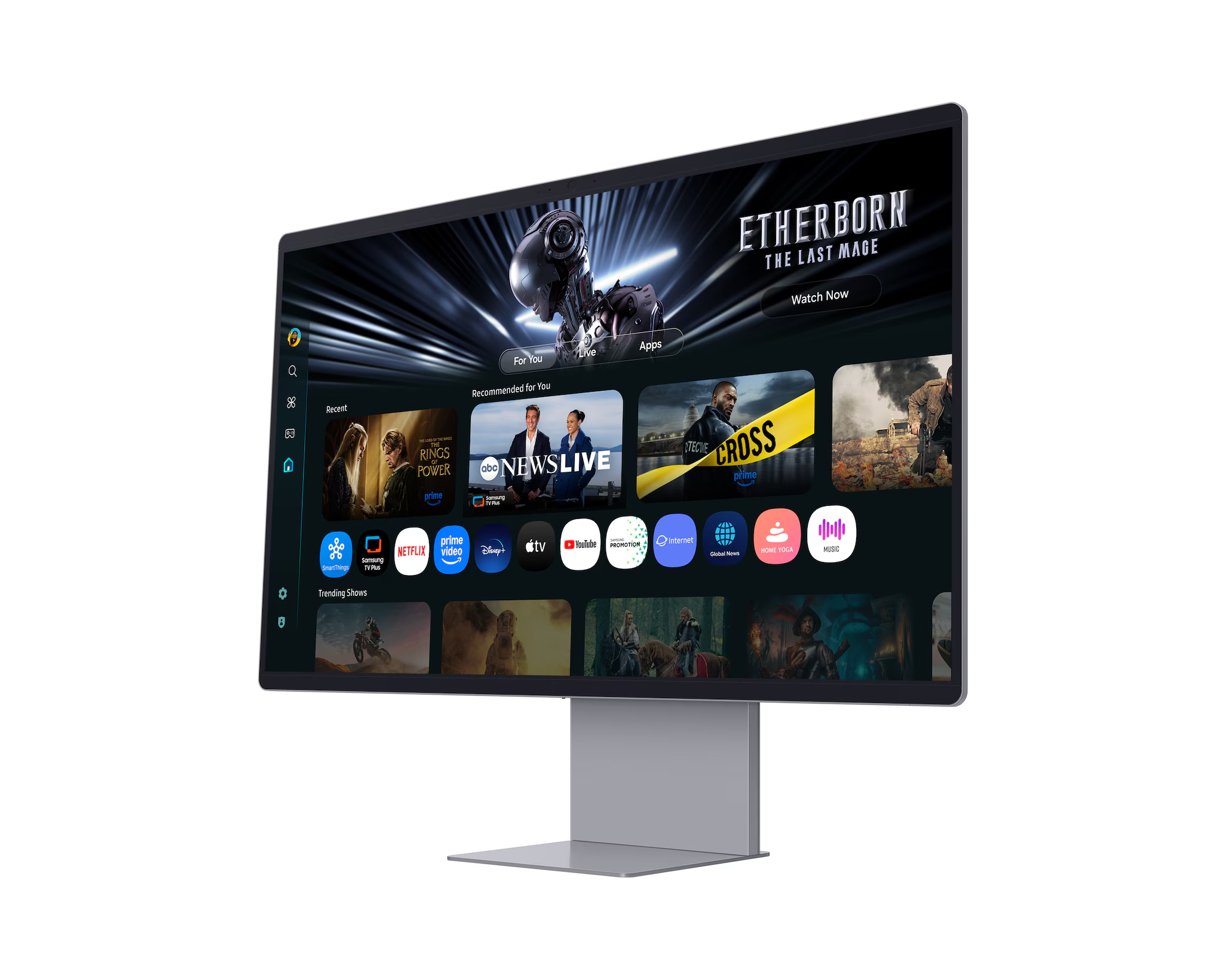
Samsung continues to redefine what a computer monitor can do with the Samsung Smart Monitor M10, an intelligent display that combines the functionality of a premium 4K monitor, a smart TV, and a productivity hub. Designed for professionals, students, creators, and home users, the M10 eliminates the need for multiple devices by integrating streaming services, cloud-based productivity tools, and AI-powered picture optimization into a single display.
Unlike conventional monitors that require a connected PC for most functions, the Smart Monitor M10 lets users work, stream, browse, and even control smart home devices directly from the monitor. Powered by Samsung’s latest Vision AI platform and Tizen OS, it delivers a smarter and more personalized experience for both work and entertainment. Samsung has expanded Vision AI capabilities across its latest display lineup, bringing AI-powered picture, sound, and personalized experiences to more devices.
Whether you’re attending virtual meetings, editing documents, watching 4K movies, or using Samsung DeX for a desktop-like mobile experience, the Smart Monitor M10 is designed to handle it all.
Samsung Smart Monitor M10 Specifications at a Glance
| Feature | Specification |
|---|---|
| Display Size | 32-inch (Expected) |
| Resolution | 4K Ultra HD (3840 × 2160) |
| Panel | Premium IPS / VA Panel |
| Refresh Rate | Up to 120Hz Adaptive |
| HDR | HDR10+ |
| Operating System | Tizen OS |
| Smart Platform | Samsung Smart Hub |
| AI Features | Vision AI, AI Picture Optimizer, AI Sound Optimization |
| Connectivity | HDMI, USB-C, USB-A, Wi-Fi, Bluetooth |
| USB-C Power Delivery | Up to 90W |
| Audio | Built-in Stereo Speakers |
| Wireless Features | AirPlay, Samsung DeX, Screen Mirroring |
| Voice Assistant | Bixby, Alexa |
Premium Minimalist Design
Samsung has maintained its elegant design philosophy with the Smart Monitor M10.
The ultra-slim bezels, premium metallic finish, and height-adjustable ergonomic stand give the monitor a modern appearance suitable for home offices, creative studios, and entertainment spaces.
Additional ergonomic adjustments include:
- Height adjustment
- Tilt adjustment
- Pivot support
- Swivel functionality
- Clean cable management
The minimal footprint also helps maximize desk space while maintaining a premium aesthetic.
Stunning 4K Display Quality
The Smart Monitor M10 features a vibrant 4K Ultra HD display that delivers exceptional image quality.
Display highlights include:
- 4K UHD resolution
- HDR10+ support
- Wide color gamut
- Excellent contrast
- High peak brightness
- Anti-glare coating
- Wide viewing angles
- Adaptive brightness
Whether editing high-resolution photos, watching HDR movies, or working with spreadsheets, the monitor produces crisp visuals and vivid colors.
Samsung’s AI Picture Optimizer automatically adjusts brightness, contrast, and color based on the content displayed and ambient lighting conditions, enhancing both comfort and image quality.
Vision AI Makes the Monitor Smarter
The Smart Monitor M10 is powered by Samsung’s latest Vision AI, which continuously analyzes content to deliver a more personalized experience.
AI-powered capabilities include:
- AI Picture Optimization
- AI Sound Optimization
- Intelligent Brightness Control
- Personalized Content Recommendations
- AI Workspace Suggestions
- AI Energy Saving Mode
- Voice Recognition Improvements
These intelligent features reduce manual adjustments while improving overall usability.
PC-Free Productivity
One of the Smart Monitor M10’s biggest advantages is its ability to function independently of a desktop computer.
Built-in productivity features include:
- Microsoft 365 access
- Remote PC connection
- Cloud Workspace
- Samsung DeX
- Multi View multitasking
- Bluetooth keyboard and mouse support
- Wireless screen sharing
This allows users to work directly from the monitor without connecting a laptop or desktop for many common tasks. Samsung’s Smart Monitor lineup supports cloud productivity tools and Samsung DeX, enabling PC-free workflows for many users.
Built-In Entertainment Center
Once work is finished, the Smart Monitor M10 transforms into a complete entertainment hub.
Users can access popular streaming services such as:
- Netflix
- YouTube
- Prime Video
- Disney+
- Apple TV
- Samsung TV Plus
- Spotify
Everything runs directly on Tizen OS without requiring an external streaming stick or media player.
The included remote control and voice assistant support make navigation simple and intuitive.
Samsung DeX Integration
Samsung Galaxy smartphone users benefit from seamless Samsung DeX support.
DeX transforms compatible smartphones into a desktop-like computing environment.
Benefits include:
- Desktop interface
- Multi-window support
- Drag-and-drop file management
- Wireless DeX connectivity
- Keyboard shortcuts
- Mouse support
For professionals who travel frequently, this feature can significantly reduce the need to carry a laptop.
Versatile Connectivity
The Smart Monitor M10 includes a wide selection of modern ports.
Available connections include:
- USB-C with Power Delivery
- HDMI
- USB-A
- Wi-Fi
- Bluetooth
- Audio output
The USB-C connection simplifies cable management by delivering video, data, and charging through a single cable.
AI Audio Enhancement
Samsung has equipped the monitor with intelligent audio processing.
Audio features include:
- Adaptive Sound
- AI Voice Enhancement
- Stereo speakers
- Automatic volume optimization
These technologies improve dialogue clarity during meetings while enhancing movies and streaming content.
Gaming Features
Although primarily designed for productivity, the Smart Monitor M10 includes several gaming-friendly features.
These include:
- Adaptive refresh rate
- Low input lag mode
- HDR gaming
- Automatic Game Mode
- Fast response times
Casual gamers will appreciate the smooth experience, although competitive esports players may still prefer dedicated gaming monitors with higher refresh rates.
Smart Home Integration
The Smart Monitor M10 also serves as a SmartThings dashboard.
Compatible smart home devices include:
- Smart lights
- Smart cameras
- Smart plugs
- Smart thermostats
- Samsung home appliances
Users can monitor and control connected devices directly from the display.
Samsung Smart Monitor M10 vs Smart Monitor M9
| Feature | Smart Monitor M10 | Smart Monitor M9 |
|---|---|---|
| Display | 4K UHD IPS/VA | 4K QD-OLED |
| AI Features | Vision AI | Vision AI |
| Smart Hub | Yes | Yes |
| Samsung DeX | Yes | Yes |
| USB-C | 90W PD | 90W PD |
| Gaming Focus | Productivity & Entertainment | Premium Gaming & Entertainment |
| Target Users | General Users | Creators & Power Users |
The Smart Monitor M10 focuses on delivering an excellent balance of productivity, entertainment, and smart features, while the M9 is positioned as Samsung’s premium OLED option with higher-end gaming capabilities.
Pros and Cons
Pros
- Sharp 4K Ultra HD display
- Samsung Vision AI enhancements
- Built-in Smart TV apps
- PC-free productivity tools
- Samsung DeX support
- USB-C with Power Delivery
- SmartThings integration
- Elegant minimalist design
- Excellent streaming experience
- Versatile all-in-one functionality
Cons
- Premium pricing compared to standard 4K monitors
- Not designed for competitive esports gaming
- Professional creators may prefer OLED for advanced color work
- Some AI features depend on software updates and internet connectivity
Buying Guide
The Samsung Smart Monitor M10 is an excellent choice for:
- Remote workers
- Students
- Business professionals
- Home office users
- Content consumers
- Samsung Galaxy users
- Hybrid work environments
- Users wanting a monitor and smart TV in one
If you’re looking for a display that combines productivity, entertainment, AI-powered enhancements, and smart home integration in a single device, the Smart Monitor M10 is an outstanding option.
Final Verdict
The Samsung Smart Monitor M10 showcases Samsung’s vision for the future of intelligent displays by blending premium 4K visuals, AI-powered enhancements, built-in entertainment, and productivity tools into a single all-in-one monitor.
Its Vision AI capabilities, Smart Hub integration, Samsung DeX compatibility, and SmartThings support make it far more versatile than a conventional monitor. Whether you’re working remotely, streaming your favorite shows, managing smart home devices, or using cloud-based productivity applications, the Smart Monitor M10 delivers a seamless experience without relying heavily on an external PC.
While dedicated gaming monitors and professional creator displays may still excel in specialized scenarios, the Smart Monitor M10 stands out as one of the most well-rounded smart monitors available for everyday productivity and entertainment in 2026.
If you enjoyed this article, don’t miss our previous posts packed with tech insights and reviews—check them out on our website!
Samsung Smart Monitor FAQs
Is the Samsung Smart Monitor M10 available?
No. As of November 2026, Samsung’s newest smart monitors are the M5, M7, M8 and M9. The M9 (M90SF) with a 4K OLED panel is the current flagship.
Which Samsung smart monitor should I buy?
The M7 is the best value 4K option, the M8 suits video calls and work, and the M9 is for people who want the best OLED picture for movies and games.
Can a Samsung smart monitor work without a PC?
Yes. Samsung smart monitors have built-in streaming apps and Samsung TV Plus, so you can watch content without connecting a computer. A Samsung account and internet connection are needed for the smart features.
Related reads
- Apple MacBook Pro M6: performance and price
- Best AI tools in 2026, including Copilot
- RayNeo Air 4 Pro AR glasses review
Free download: our Excel Shortcuts Cheat Sheet 2026 is perfect next to a big work monitor, free for a limited time.